

Build call masking with Conversation API
Step-by-step call masking: virtual number, dialplan URL, DIAL bridge, and callback tracking.
Build anonymous two-party calling: Client A calls your virtual number X, your server responds with a dialplan that bridges A to Recipient B — without either party seeing the other's real phone number.
PrerequisiteRead Call Masking for the concept, then ensure you have a virtual number and OAuth token.
Scenario
| Party | Role | Example number |
|---|---|---|
| Client A | Initiates the call | +123456789 |
| Center X | Your virtual number | +12015976882 |
| Recipient B | Connected party | +987654321 |
Flow: A calls X → Routee POSTs call details to your Dialplan URL → your server returns a dialplan with a DIAL verb to B → A and B are connected anonymously.
Step 1: Rent and configure the virtual number
- Sign in at go.routee.net and rent a number (or use Rent a number).
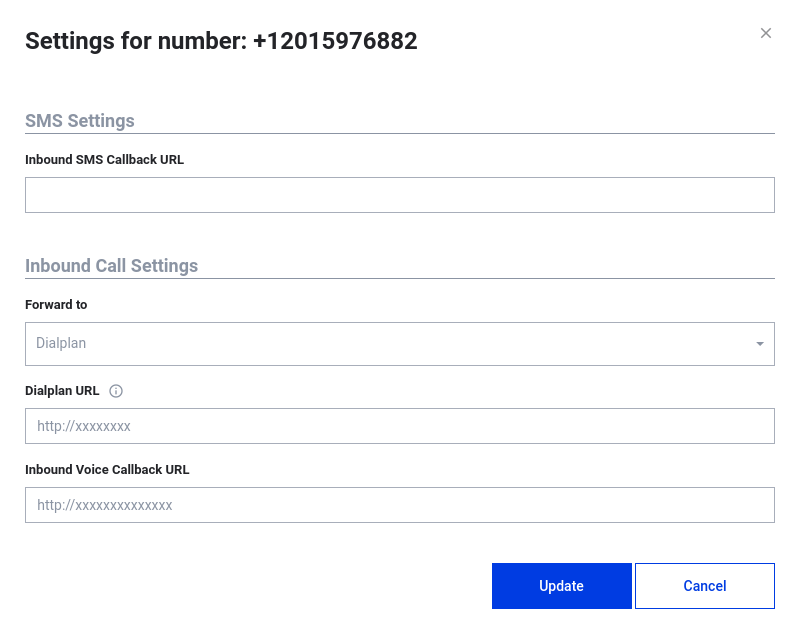
- On the number settings, set:
- Dialplan URL — your endpoint that returns the call flow
- Inbound Voice Callback URL — receives inbound call status events
Step 2: Handle the inbound dialplan request
When A calls your virtual number, Routee POSTs to your Dialplan URL:
{
  "messageId": "me66d22e-dc10-48de-b696-45f63c6d0aad",
  "conversationTrackingId": "666e3777-f32a-4350-996b-364018d457b5",
  "from": "+123456789",
  "to": "+12015976882"
}
Respond with HTTP 200 and a JSON body containing a valid dialplan. Example that plays a prompt then dials B:
{
  "dialPlan": {
    "verbs": [
      {
        "type": "SAY",
        "message": {
          "language": "en-US",
          "gender": "female",
          "text": "Connecting your call."
        }
      },
      {
        "type": "DIAL",
        "from": "+12015976882",
        "callback": "https://my-server.example/outbound-callback",
        "to": {
          "phone": "+987654321"
        }
      }
    ]
  }
}| Verb | Purpose |
|---|---|
SAY | Optional message while connecting |
DIAL | Bridge the caller to recipient B using the virtual number as caller ID |
See Voice Conversations for all supported verbs.
Step 3: Inbound callback payload
Routee POSTs inbound call status to your Inbound Voice Callback URL:
{
  "messageId": "wwq6d22e-kz10-4dde-jojo-aksjc6d0aad",
  "to": "+12015976882",
  "from": "+123456789",
  "country": "US",
  "price": 0.0015,
  "originatingService": "Voice",
  "conversationTrackingId": "666e3777-f32a-4350-996b-364018d457b5",
  "status": {
    "name": "Completed",
    "updatedDate": "2020-03-09T10:11:27.441Z"
  },
  "direction": "Inbound",
  "duration": 20,
  "createdAt": "2020-03-09T10:11:07.547Z"
}
Step 4: Outbound (bridged) callback
The DIAL verb's callback URL receives the outbound leg status:
{
  "messageId": "an1t22-3jo2-8dds-djll-and9d9dalkdj",
  "conversationTrackingId": "666e3777-f32a-4350-996b-364018d457b5",
  "to": "+987654321",
  "from": "+12015976882",
  "status": {
    "name": "Completed",
    "updatedDate": "2020-03-09T10:11:27.547Z"
  },
  "direction": "Outbound",
  "originatingService": "Voice",
  "duration": 30,
  "price": 0.002
}
Tracking calls
- Each leg has its own
messageId - Both legs share the same
conversationTrackingId— use this to correlate the masked conversation - Inbound duration (A → X) appears on the inbound callback; bridged duration (A ↔ B) on the outbound callback
Outbound-initiated alternative
To start the flow via API instead of waiting for an inbound call, use Perform a voice conversation — see also Click-to-Call example.
Next stepsVoice conversation callbacks · Call Masking concept · Setup a basic IVR
Updated 2 months ago